Starting Out
Welcome, Commander. In Hex-Empire, you begin your journey placed randomly at an open base. Your ultimate goal is to expand your territory, harvest resources, build infrastructure, and capture settlements (Towns, Cities, Capitals, and Strategic Ports) to accumulate Victory Points (VP) and rise to the top of the standings.
Always build outward from your base. Your initial turns should focus on upgrading your home base, claiming nearby settlements with roads, and maximizing your resource intake. Unsupplied areas yield less, so stay connected!
-
1
Upgrade Infrastructure
Click on your home base or town to upgrade defenses, build high-durability brick walls, or upgrade a town into a full-scale city (Cities yield higher supply and unit storage capacities).
-
2
Expand Road Networks
Lay down roads to claim adjacent hexes and connect outlying resource fields (Wood, Brick, Sheep, Food, Ore). Road networks supply your marching armies and prevent catastrophic supply attrition.
-
3
Mobilize Armed Forces
Train military units (Standard Units, Cavalry, Pikemen, Legions, Archers, Teutonic Knights, and Siege Trebuchets) to defend your borders and conquer competing empires.
Action Points (AP) & Trade Economy
Action Points (AP) govern every movement, attack, construction order, and unit training session. AP automatically regenerates over time (1 tick every 60 seconds).
When trading via Maritime Trade (4:1) (requires any Coastal Town) or a connected Strategic Port (2:1 + 1 AP Refund), simply type the exact amount of resource you are willing to trade (or click the MAX button):
- Live Return Calculation: Typing
100Ore in 4:1 Maritime Trade automatically calculates and displaysYou Trade: 100 ORE ➔ You Receive: 25 SHEEP(or50 SHEEPat a 2:1 Specialty Port). - Unspent Remainder Protection: If you type a number that is not an exact multiple of 4 (or 2 at a Port)—for example, typing
25in 4:1 trade—only the valid bundle (24) is spent for6in return, and the leftover1is safely kept in your stockpile.
Settlements, Specialist Cities & Fortifications
Settlements are the backbone of your realm's economy, military recruitment, and territorial control. Build Towns along your road or shipping network and strategically upgrade them into specialized metropolises.
Harvests all adjacent resource tiles hourly. Serves as a stationing node for 1 garrison unit. (First Town on a distant uncolonized island is capped at max 500 of each resource!)
Doubles hourly resource yields (2x), increases unit training speeds, and unlocks defensive Wall construction and City Specialization.
Upgraded from an owned City. Specializes in heavy siege engineering and exclusively trains Trebuchets (🎯)! Unlocks Level 5 Fortress Walls.
Upgraded from an owned City. Houses the Master Equipment Armory for crafting custom army gear with adjustable quality sliders and training Teutonic Knights (✠)! Unlocks Level 5 Fortress Walls.
Upgraded from a coastal City. Exclusively commissions War Galleys (⛵), Dreadnoughts (🚢), and Explorer Scout Boats (🧭), boosts adjacent fishing yields, and unlocks Level 5 Fortress Walls.
👉 View Step-by-Step Boat Building Guide
Upgraded from an owned City. Houses up to 4 stationed garrison units simultaneously (all 4 defend together!), provides 3x faster passive HP regeneration (+15%/hr), and unlocks Instant Medical Triage & Level 5 Fortress Walls.
👉 View Step-by-Step Hospital Building Guide
Upgraded from an owned City. Exclusively trains Archers, houses up to 2 stationed Archers, fires automatic 2x damage Overwatch volleys at approaching enemies up to 2 roads away, and unlocks Level 5 Fortress Walls.
Designated on any owned Town or City. Resets the distance tax penalty to 1.0x for all nearby provinces! Trains Heavy Legions & unlocks Level 5 Fortress Walls.
Phase 2 Complete Citadel: +80 AP, 500 Wood/Brick/Ore/Food (5,000 HP). 100% Distance-Tax exempt! Holds 4 units; only Trebuchets damage structural HP (300/hit). Garrisoning a Teutonic Knight (✠) makes a completed Fortress impregnable to melee assault!
Grants 5-hex Passive Sight around your coast and unlocks 🔭 Spy Vision (60 AP, 200 Food, 200 Sheep) to illuminate any 7-hex circle (169 tiles) on the map for 30–60 minutes!
Navigable canals cut along land edges so inland harbors connect directly to coastal sea lanes and ocean fleets.
As you expand far from your Capital, Distance Tax increases construction costs. To ensure ultra-long-range island colonization is always possible within the 500 resource storage limit:
- One-Off 500 Cap on Uncolonized Islands: When building your very first Town on a distant island where you do not yet own any settlements, the required Wood, Brick, Sheep, and Food are capped at a maximum of 500 each (4 AP).
- Establish a Regional Capital to Expand Locally: Once your first Town is built on that island, designate it as a Regional Capital (⭐) to reset local Distance Tax to 1.0x across the island! Attempting to build a second Town on that same distant island without a Regional Capital remains uncapped.
Settlements can construct and upgrade Defensive Perimeter Walls. Each wall level increases structural defense against melee assaults and provides solid cover against enemy archery and naval volleys.
| Wall Tier | Upgrade Cost | Defense Bonus | Eligible Settlements |
|---|---|---|---|
| Level 1 (Wooden Wall) | 20 Wood, 5 Food, 2 Sheep | +1 Structural Defense | All Settlements |
| Level 2 (Brick Wall) | 10 Wood, 20 Brick, 5 Food, 2 Sheep | +2 Structural Defense | All Settlements |
| Level 3 (Reinforced Wall) | 10 Wood, 20 Brick, 20 Ore, 5 Food, 2 Sheep | +3 Structural Defense | Max tier for basic Towns & Cities |
| Level 4 (Citadel Wall) ⭐ | 40 Wood, 80 Brick, 80 Ore, 20 Food, 8 Sheep (4x Level 3 Tier) |
+4 Structural Defense (+8 with Legion garrison!) |
Specialized Cities (🏭⚒️⚓🏥🏹🗼) & Capitals (👑) |
| Level 5 (Citadel Fortress Wall) 👑 | 80 Wood, 160 Brick, 160 Ore, 40 Food, 16 Sheep (2x Level 4 Tier) |
+5 Structural Defense (Massive ×1.85 scaling with Teutonic Knights!) |
Workshops (🏭), Forges (⚒️), Naval Bases (⚓), Hospitals (🏥), Archer Towers (🏹), Lighthouses (🗼) & Capitals (👑) |
💡 Level 4–5 Citadel & Fortress Walls render with radiant imperial aura and animated rotating bastion turrets around your perimeter, and are supported in the Multi-Settlement Batch Wall Upgrade tool.
When a settlement's walls are damaged or destroyed by enemy siege bombardment (Trebuchets or Dreadnoughts), wall reconstruction is blocked under a mandatory 24-hour breach penalty. A live countdown timer is displayed in the Settlement Management window, and bulk multi-settlement wall upgrade orders automatically skip breach-locked locations until their timers expire.
Commanders can demolish owned settlements from the Settlement Hub to relocate or reorganize their territory, returning the vertex to open terrain for future road or settlement construction.
Step-by-Step: How to Build a Hospital City
A frequent question from commanders is: "Where do I build Hospitals? I can't find them in the bottom toolbar!" In Hex-Empire, Hospitals are City Specializations. They cannot be placed directly on raw ground from the build bar; you must follow the three-tier settlement upgrade tree:
There is no standalone "Hospital" button in the bottom build toolbar. To build a Hospital, you must first build a Town (🏡), upgrade it into a City (🏙️), and then upgrade the City into a Hospital City (🏥) via the Settlement Management window!
-
1
Step 1: Found a Town (🏡)
Select Town (🏡) from your bottom build toolbar and click on any discovered vertex junction connected to your road network.
Base Cost: 1 Wood, 1 Brick, 1 Sheep, 1 Food (4 AP) (+ distance tax). -
2
Step 2: Upgrade to a City (🏙️)
Click directly on your owned Town on the map to open the Settlement Management window. Look for the City Upgrade panel and click [ Upgrade to City 🏙️ ].
Base Cost: 3 Food, 2 Ore, 4 AP (+ distance tax).
Upgrading doubles the settlement's hourly harvest yields (2x) and unlocks City Specializations. -
3
Step 3: Specialize into a Hospital City (🏥)
Click on your new City on the map to open Settlement Management. Scroll down past the wall fortification section to find the Hospital City Upgrade panel (marked with 🏥). Click [ Upgrade to Hospital City 🏥 ].
Base Cost: 350 Brick, 350 Sheep, 350 Food, 12 AP (+ distance tax).
💡 Tip: If distance tax pushes the cost above your storage limit, designate a nearby settlement as a Regional Capital (⭐) first to reset local tax to 1.0x! -
4
Step 4: Command Your Hospital Super-Powers
Your settlement is now a fully operational Hospital City, unlocking extraordinary defensive and medical powers:
- 🛡️ Quadruple Garrison Capacity (4 Units simultaneously!): Standard settlements can hold only 1 garrison unit. A Hospital City holds up to 4 permanent garrison units! If attacked, all 4 units defend together in combat, combining their stats, Hero bonuses, and Forge equipment to share casualties.
- ❤️ 3x Rapid Passive HP Healing (+15%/hr): Wounded armies stationed in a Hospital City passively regenerate +15% HP per hour (compared to the standard +5%/hr rate at basic towns).
- 🚑 Instant Medical Triage: Access rapid emergency medical treatment to immediately restore injured troops to full combat readiness.
- 🏰 Level 4 Citadel Fortifications: Hospital Cities are authorized to construct Level 4 Citadel Walls (+4 structural defense; +8 with Legion garrison), surrounded by radiant gold bastions.
Forge Cities & Army Equipment Crafting
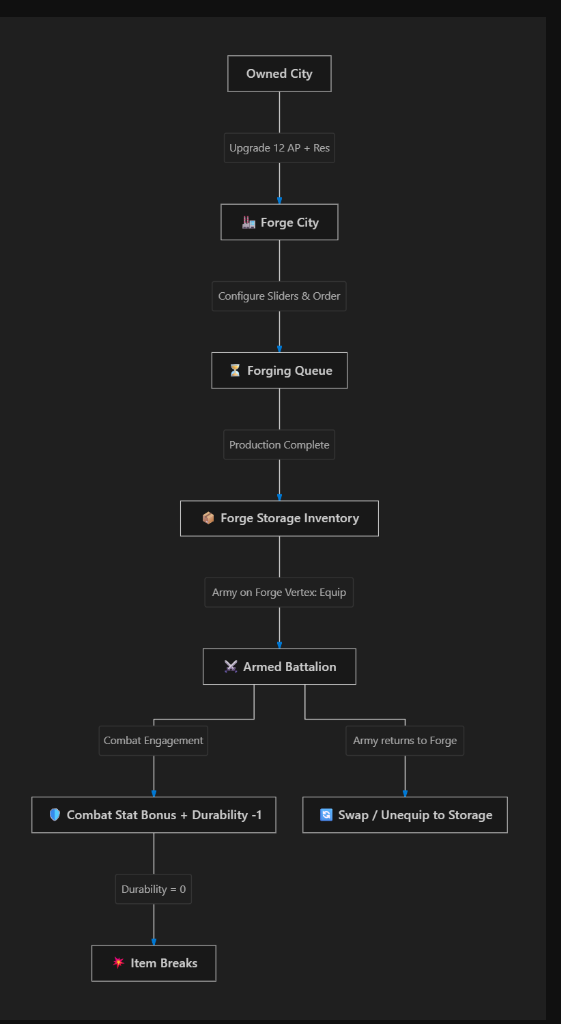
Forge Cities are premier industrial metropolises dedicated to blacksmithing, foundry casting, and armament manufacturing. Once upgraded from an owned City, a Forge provides access to the Master Equipment Armory where commanders can commission custom, tailored battle gear for entire army cohorts.
Secondary Stat: +0.5 to +5.0 Parry Defense.
Equippable by: Standard Armies, Cavalry, Pikemen, Teutonic Knights, Legions. (Archers & Trebuchets strictly blocked).
Secondary Stat: +0.8 to +8.0 Mitigation Defense.
Equippable by all unit archetypes including Trebuchets (Iron Plating).
Secondary Stat: +2 to +20 Army Health Points.
Equippable as Boots by Infantry/Cavalry/Archers, and as ⚙️ Reinforced Wheels for Trebuchets to dramatically increase siege march speed!
When crafting an item, commanders can fine-tune 3 independent parameters:
- Durability (6 to 15 combat uses): Determines how many battles/clashes the equipment can withstand before breaking.
- Primary Stat Multiplier (1 to 10): Dictates the core combat potency of the gear (Attack, Armor HP, or March Speed reduction).
- Secondary Stat Multiplier (1 to 10): Enhances auxiliary defensive or health capabilities.
Exponential Cost Scaling: As the overall item quality tier \(Q = (\text{Durability} - 5) + \text{Primary} + \text{Secondary}\) rises from 3 up to 30, the required AP, Ore, Wood, Brick, and crafting duration scale exponentially. Maxing out a masterwork tier 30 item represents a massive economic investment that produces overwhelming combat dominance.
- Zero Distance Tax on Forging: Blacksmithing and equipment crafting orders are 100% exempt from distance taxation. Commanders can craft weapons, armor, and gear at any owned Forge City across the realm at standard base resource costs, regardless of distance from your capital.
- Forge Storage: Completed equipment is automatically delivered to the Forge City's storage armory.
- Equipping Troops: Armies stationed directly on the Forge vertex can equip items from storage or return previously equipped items back to the armory.
- ⚙️ Reinforced Wheels for Trebuchets: While Footwear crafts boots for infantry and cavalry, Trebuchets can equip Reinforced Wheels in the footwear slot to overcome their slow overland march speed.
- Queue Timers & AP Speed Boost: Active forging orders feature live countdown timers (formatted cleanly in multi-day style for long crafts) and can be expedited instantly using the AP Speed Boost button.
- Passive Durability Healing: Stationing an army with equipped gear at an owned Forge City restores and repairs durability over time.
- Instant Polish & Repair: Commanders can click the "🛠️ Polish & Repair Gear" button inside the Forge Armory to immediately restore all damaged equipped items back to 100% maximum durability.
- Combat Degradation: Each combat clash or settlement assault decrements the durability of all equipped gear by 1. When durability reaches 0, the item breaks and is destroyed.
- Order Cancellation: In-progress forging orders can be cancelled at any time for an immediate 50% resource and AP refund.
Land, Siege & Naval Military Units
Your armed forces consist of 10 specialized unit types across land, siege, and high-seas warfare. Active mobile units consume Food supply (harvested from crops or fishing), broken out by exact unit class in Strategic & Economic Intelligence; unsupplied troops cut off from your road or shipping network rapidly suffer from starvation.
| Unit Type | Cost | Base Power | Speed | Tactical Role & Special Abilities |
|---|---|---|---|---|
| 🗡️ Standard Army | 20 AP, 15 Wood, 25 Food | 10 | 1x (10m / 1m boosted) | Reliable baseline infantry with low recruitment cost and steady field upkeep. |
| 🛡️ Heavy Legion | 40 AP, 40 Wood, 30 Ore, 60 Food (Regional Capitals only) |
20 | 1x (10m / 1m boosted) | Armored juggernaut with +3 Strength bonus and massive physical defense. Ideal garrison defender. |
| 🏇 Cavalry | 30 AP, 25 Wood, 40 Food, 30 Sheep | 15 | 2x (5m / 30s boosted) | Double movement speed, +1.5 Attack, +3 Defense. Perfect for rapid flanking. |
| 🔱 Pikeman Suggested by @Bartlord |
20 AP, 30 Wood, 25 Food, 10 Ore (24h • All Towns/Cities) |
24 vs Cavalry (Stationed Only) 9 Base · +3 Def (+7 vs Cav) · ×1.35 Wall (×1.55 vs Cav) |
1x (10m / 1m boosted) | Stationed Cavalry Counter: Digs long pikes into the ground while Stationed to break Cavalry charges (24 CP) at lower cost & half the training time of Cavalry (buildable everywhere Cavalry are trained). Note: While Moving or marching into a clash, Pikemen fight at 9 CP and lose to Cavalry — plant them early on chokes and frontier Towns! |
| ✠ Teutonic Knight | 40 AP, 40 Wood, 80 Brick, 120 Ore, 80 Food, 30 Sheep (72h • Lv 4+ Wall, Forge or Capital) |
+7 Def · ×1.85 Wall Mult | 0.83x (12m / 72s boosted) | Impregnable Fortress Anchor: Ultimate siege-stopping garrison paladin. When stationed inside a completed Great Fortress (🏰), blocks all enemy melee assaults! Reduced field assault bonus (+0.5) outside garrisons. |
| 🏹 Archer | 20 AP, 60 Wood, 40 Food, 30 Ore | 12 | 1x (10m / 1m boosted) | Arrow Volley: Fires ranged volleys up to 1 hex away (1 AP, 5m reload). Deals 25% damage in the open / 8% vs walled cities without retaliation. Garrisoned in an Archer Tower (🏹), triggers 2x damage Overwatch up to 2 roads away! |
| 🎯 Trebuchet | 35 AP, 150 Wood, 80 Brick, 100 Ore (Workshop Cities only) |
8 | 0.5x (20m / 2m boosted) | Siege Bombardment: Unpacks in 30m (2m boosted) into siege mode 🎯. Fires heavy boulders up to 2 hexes away (2 AP, 15m reload). Inflicts 60% HP unit damage, 300 HP Fortress damage, and demolishes 1 Wall Level per strike! |
| ⛵ War Galley 👉 How to Build Boats |
25 AP, 80 Wood, 50 Sheep, 20 Ore (24h • Naval Base Cities only) |
18 | 2.5x Sea (4m / 24s boosted) | Broadside Volley & Rapid Demolition: Fast naval raider restricted to shipping routes, channels & coastal vertices. Fires broadside volleys up to 1 hex away (1 AP, 10m reload; 30% open / 12% walled damage). Captures enemy shipping lanes at 50% speed! Direct melee assault capable. |
| 🚢 Dreadnought 👉 How to Build Boats |
40 AP, 140 Wood, 80 Sheep, 100 Ore (48h • Naval Base Cities only) |
32 | 1.67x Sea (6m / 36s boosted) | Heavy Naval Bombardment & Route Demolition: Armored capital warship on shipping routes, channels & coasts. Fires long-range artillery up to 2 hexes away (2 AP, 15m reload) without unpacking, dealing 50% HP damage and demolishing 1 Wall Level per strike! Captures enemy shipping lanes at 50% speed! |
| 🧭 Explorer Scout Boat | 15 AP, 40 Wood, 15 Food (6h • Max 1/player • Naval Base) |
0 CP (Destroyed on Contact) | Open Sea: 3m Calm / 6m Choppy (1.5m/3m on Sea Lanes) |
Off-Road High-Seas Scout: Freely sails uncharted open ocean tiles without shipping routes, granting 3-hex Crow's Nest Lookout Vision up to 90 hexes from friendly ports! Exempt from garrison slots. Destroyed on any enemy collision. |
Ranged Immunity: When Archers, War Galleys, or Dreadnoughts bombard non-ranged targets, the target cannot counter-attack at distance.
Surviving Archer Retaliation: If you fire a 1-hex volley at enemy Archers and they survive the incoming strike (HP > 0%), the surviving enemy Archers will immediately return fire with an instant counter-volley!
Fortification & Wall Cover: Open ground units take 25% damage from Archer volleys (30% from War Galleys). Units garrisoned within a walled settlement gain strong stone cover, taking only 8% damage from Archers (12% from War Galleys).
Sieging Enemy Settlements: Stationing an army on an enemy settlement places it under siege (marked with a red ⚔️ Sieging enemy City indicator), suppressing enemy yields and blocking reinforcements.
🎯 Siege Artillery Doctrine (Melee Prohibition): Trebuchets are specialized long-range bombardment weapons and are strictly prohibited from participating in direct melee settlement assaults. By contrast, War Galleys (⛵) and Dreadnoughts (🚢) can both bombard from offshore and directly assault coastal settlements, ports, and shipping routes!
Wall Demolition (Trebuchets & Dreadnoughts): Unpacked Trebuchets (60% HP damage) and offshore Dreadnoughts (50% HP damage) can bombard enemy settlements up to 2 hexes away and demolish 1 Wall Level per strike (e.g. from Level 4 to Level 3).
⏱️ 24-Hour Rebuild Lockout Penalty: When a settlement's defensive walls are damaged or destroyed by bombardment, wall repairs and rebuilding at that settlement are placed under a mandatory 24-hour breach penalty.
Safe Defensive Bombardment: If an enemy army is sieging your own town or city, bombarding them with a Trebuchet, Dreadnought, War Galley, or Archers deals full damage to the invaders while inflicting zero damage to your own settlement or walls.
Naval units are specialized maritime warships commissioned exclusively at coastal Naval Base Cities (⚓). They dominate the high seas, provide coastal bombardment, and execute rapid maritime demolition operations across enemy shipping routes:
- 🌊 High-Seas Domain: War Galleys and Dreadnoughts are restricted to deep-water shipping lanes, coastal beach vertices, and strategic ports. They cannot sail onto inland land roads or landlocked settlements.
- 🗺️ Hostile Shipping Route Traversal & Capture: Both War Galleys and Dreadnoughts (alongside land armies across hostile roads) can chart multi-segment voyages straight through connected enemy shipping lane networks!
- ⚓ Rapid Demolition & Real-Time Route Capture: As your War Galleys and Dreadnoughts sail past each enemy shipping lane segment, the route is dynamically severed, demolished, and captured under your empire's banner in real time! This instantly cuts enemy maritime supply lines, breaks trade route connectivity, and triggers isolation and starvation countdowns on remote enemy islands.
- 🌊 Contested Waters Speed Penalty (50% Speed / 2x Duration): Sailing through hostile enemy shipping lanes halves the vessel's cruising velocity (doubling segment duration to 480s for War Galleys and 720s for Dreadnoughts; 48s/72s when speed boosted). Cruising through friendly and allied shipping routes incurs no penalty, maintaining full cruising velocity. The auto-pathfinder automatically factors in this penalty and displays
[Enemy Waters: 1/2 Speed]in the march draft. - 🎯 Long-Range Coastal Bombardment:
- War Galley Broadside (1 Hex): Fires broadside volleys up to 1 hex away (1 AP, 10m reload) dealing 30% open / 12% walled damage without retaliation (unless surviving enemy Archers return counter-fire).
- Dreadnought Naval Artillery (2 Hexes): Heavy capital warship artillery striking targets up to 2 hexes away (2 AP, 15m reload) without needing to unpack! Inflicts 50% HP unit damage and demolishes 1 Wall Level per strike (triggering a 24-hour rebuild lockout)!
- Safe Harbor Defense: Bombarding enemy armies sieging your own coastal cities or ports deals full damage to the invaders while dealing zero damage to your own settlement or walls.
- ⚔️ Direct Coastal Melee Assaults: Unlike land-based Trebuchets (which are barred from direct melee combat), both War Galleys and Dreadnoughts can directly attack coastal settlements, enemy ports, and hostile shipping route edges in melee combat, or combine forces in 3-army assault cohorts with adjacent forces.
- ⚓ Strategic Port Garrisons (+1 Def) & Deployment: Warships stationed at Strategic Ports gain a +1 Naval Garrison Defense bonus and can be launched immediately into combat or exploration via the Port Hub's [ ⚔️ March Garrison ] action.
- 👑 Hero Synergy & Forge Boots: Faction Heroes assigned to naval units grant Ocean Speed (+10% cruising speed per point across shipping lanes) and survivability perks, while forged Speed Boots further accelerate open-ocean navigation.
Garrison Capacities: Standard settlements and road junctions hold a maximum of 1 stationed unit. Archer Towers (🏹) hold up to 2 Archers, while Hospital Cities (🏥) and Great Fortresses (🏰) expand garrison capacity to 4 stationed units simultaneously! All defenders inside combine their combat defense, Hero stats, and Forge gear together and share casualties.
⚔️ Coordinated Assault Cohorts: Up to 3 owned armies stationed directly on or positioned adjacent (1 road/shipping edge away) to a competitor settlement, road, or shipping lane automatically join together as a coordinated assault cohort, combining their attack strength and casualty absorption.
🛡️ Marching Army Protection: Armies currently moving or marching along roads are safely excluded from assault cohort drafts until their march concludes and they are stationed, ensuring ongoing troop movements are never prematurely interrupted.
12h Overflow Starvation: If a joint assault is victorious, all surviving armies enter the conquered settlement. The primary army stays as garrison (up to building capacity), while any overflow armies trigger a 12-hour eviction timer. Move them off the vertex within 12 hours or they will die of starvation!
Managing Food Consumption: Active field units consume Food (🌾) every minute (harvested from Wheat fields and Sea fishing tiles), with exact class-by-class costs broken down in Strategic & Economic Intelligence and recruitment screens. If you foresee a food shortage or wish to optimize your supply lines, you can selectively retire individual armies using the Disband (1 AP) button on the Army Selection Bar, Active Armies Widget, or Settlement Garrison Card.
Safe Hero Unassignment: Disbanding an army costs 1 AP and permanently retires the unit, immediately stopping its food drain. Any assigned Faction Hero will automatically be unassigned and safely returned to your hero roster without loss of level or XP.
Step-by-Step: How to Build Boats & Sail the Oceans
Commanding a high-seas naval fleet requires two distinct components: A Coastal Naval Base City (where warships are commissioned) and Shipping Routes (the maritime lanes that boats sail along). Here is the complete step-by-step procedure:
The "Ship (🚢)" icon on the bottom build toolbar is NOT a boat unit—it is the Shipping Route tool used to paint sea lanes across ocean water (the maritime equivalent of roads). Actual boats—War Galleys (⛵) and Dreadnoughts (🚢)—are military combat units recruited exclusively inside coastal Naval Base Cities (⚓)!
-
1
Step 1: Settle on a Coastal Vertex (Touching Ocean Water)
To build warships, your settlement must touch at least one Ocean hex (deep water tile). Landlocked inland cities cannot build boats.
1. Connect a road to a coastal vertex bordering the sea.
2. Build a Town (🏡) on that coastal vertex (1 Wood, 1 Brick, 1 Sheep, 1 Food, 4 AP).
3. Click the Town, open Settlement Management, and click [ Upgrade to City 🏙️ ] (3 Food, 2 Ore, 4 AP). -
2
Step 2: Upgrade to a Naval Base City (⚓)
Click your coastal City on the map to open the Settlement Management window.
Because your City is on the coastline touching ocean water, the Naval Base Upgrade panel appears!
Click [ Upgrade to Naval Base ⚓ ].
Base Cost: 180 Wood, 120 Sheep, 120 Ore, 12 AP (+ distance tax).
Your settlement icon now displays an anchor (⚓), designating it as a sovereign naval shipyard. -
3
Step 3: Commission Your Warships (Boats) in the Shipyard
Click directly on your owned Naval Base City (⚓) on the map to open the management window. Scroll down to the Naval Base Shipyard recruitment section. You can recruit two classes of warships:
War GalleyCost: 25 AP, 80 Wood, 50 Sheep, 20 Ore.
Speed: 2.5x Sea Speed (4m per segment; 24s boosted).
Combat: Fast raider. Fires 1-hex ranged broadsides (30% open / 12% walled damage). Captures enemy sea lanes in real time!DreadnoughtCost: 40 AP, 140 Wood, 80 Sheep, 100 Ore.
Speed: 1.67x Sea Speed (6m per segment; 36s boosted).
Combat: Armored battleship. Fires 2-hex long-range naval artillery (50% HP damage) and demolishes 1 Wall Level per strike!Explorer Scout BoatCost: 15 AP, 40 Wood, 15 Food (Max 1).
Speed: Open Sea 3m Calm / 6m Choppy.
Role: Sails open ocean without shipping lanes, grants 3-hex Lookout Vision (90-hex range), exempt from garrison slots.Click [ Build War Galley ⛵ ], [ Build Dreadnought 🚢 ], or [ Commission Scout Boat 🧭 ]. Your vessel will spawn ready at your Naval Base!
-
4
Step 4: Lay Down Shipping Routes (🚢) for Warships to Sail On
War Galleys and Dreadnoughts require marked sea lanes (or Channels) and cannot travel on inland roads (only the Explorer Scout Boat 🧭 crosses open sea unassisted!).
1. Select Ship (🚢) in your bottom build toolbar.
2. Cost: 1 Wood, 1 Sheep, 2 AP per segment (+ distance tax; capped at max 80 Wood & 80 Sheep from Strategic Ports).
3. Click on the water edges connected to your Naval Base to extend Shipping Routes across the ocean to neighboring islands, coastal colonies, and Strategic Ports. -
5
Step 5: Chart Voyages & Dominate the High Seas
Click your War Galley or Dreadnought, then click along connected Shipping Routes to plan your voyage (costs 1 AP to march):
- 🗺️ Full Hostile Lane Penetration: Chart multi-segment voyages straight through an opponent's shipping lane network across the ocean!
- 💥 Dynamic Real-Time Demolition: As your warships cruise through enemy waters, they automatically demolish and convert every enemy shipping lane segment to your ownership in real time (sailing at 50% speed in contested waters)!
- 🎯 Offshore Coastal Bombardment: Click your warship and choose Fire Broadside (War Galley, 1 hex) or Fire Bombardment (Dreadnought, 2 hexes) to bombard coastal enemy armies and walled cities without taking return damage.
- ⚓ Strategic Port Synergy: Warships stationed at Strategic Ports gain a +1 Naval Garrison Defense bonus.
Tactical Faction Heroes
Lead your armies to glory by recruiting powerful Faction Heroes. Assign them to stationed units, gain massive combat bonuses, level them up, and customize their skills using an interactive Attribute Radar Chart.
Recruit heroes from the Faction Hub. Give them custom names and choose/upload unique avatars. When assigned to an army, the hero's avatar renders directly on the map as the army token, showcasing your legendary generals on the battlefield!
Hero Attributes Guide:
- Land Speed: Increases the march rate of the unit across roads and outposts.
- Ocean Speed: Decreases transit times across deep water shipping channels.
- Attack Bonus: Adds flat bonuses to the attacker's roll in combat.
- Defense Bonus: Adds flat bonuses to the defender's roll in combat.
- Health Bonus: Lessens casualty damage taken, keeping units combat-ready longer.
- Vitality Bonus: Increases the starvation timer, adding hours of buffer to the eviction clock.
XP & Leveling: Winning battles yields 50 XP to the primary hero leading the attack, and 15 XP (25% share) to other heroes in the same cohort group. Every 100 XP levels up the hero, granting +1 Stat Point to spend.
Weekly Cooldown: To prevent rapid redeployment exploits, changing a hero's assigned army is restricted to once every 7 days (weekly cooldown). Plan assignments carefully!
Armies & Group Management
Manage large empires with ease. Utilize the Active Armies modal to track all forces, organize armies into custom groups, and utilize multi-army auto-spreading moves to conquer sectors without pathing conflicts.
-
⚔️
Active Armies Panel & Allied Training Badges
Click the sword icon (⚔️) in the top menu to open a complete overview of all your forces. Monitor unit types, stationed status, HP, current coordinates, and trigger instant Focus, Rename, or Speed Boost actions. Settlements currently training new units display a glowing gold
+badge on both your own cities and allied settlements! -
🖱️
Shift-Click & Shift+Drag Box Multi-Select
Hold the Shift key and click stationed units—or hold Shift and drag a selection marquee box across the map—to select multiple armies at once (plus tap-to-add support!). Selected units glow with pulsing rings. Right-click anywhere on the map or press Esc to instantly deselect all.
-
🌀
Multi-Army Auto-Spreading March
When marching multiple selected units to a single target vertex, the pathfinder automatically distributes them to unique nearby road outposts and junctions, preventing collision errors since road junctions only support 1 unit maximum.
-
📍
Settlement Rally Points ("Go to point")
Set a destination Rally Point inside any settlement's recruitment hub so newly finished units automatically mobilize toward your frontline upon completing training.
-
📋
Tactical Army Groups
Organize armies into groups (e.g. "Frontline Force"). Use the Army Groups tab in the modal to execute mass actions like centering the camera on a group's average position, renaming group lists, or selecting all group members for a coordinated march.
-
🎯
Live Drag-and-Drop March Targeting & Clickable Traveling Units
When an army is selected—including clicking directly on a traveling unit on the map while it is marching—click and drag the golden pulsing target circle (or click connected road vertices) to extend its endpoint in real-time, showing live road segment counts, march duration estimates, and AP costs!
The auto-pathfinder utilizes a weighted Dijkstra routing algorithm that prioritizes the shortest valid path while favoring friendly over enemy roads of equal length:
- 🤝 Allied Road Traversal: Armies freely pathfind and march through road and maritime networks owned by allied players at full cruising speed. You and your allies share seamless military transit rights across each other's entire road and shipping infrastructure!
- ⚔️ Universal Enemy Road & Sea Traversal (50% Speed / Auto-Capture): All land armies and naval vessels can now chart multi-segment routes straight through connected enemy road and shipping lane networks! Moving through hostile segments halves cruising velocity (2x duration, labeled in the march draft), and each enemy segment is dynamically captured in real time as your unit marches across it—until stopping at any fortified enemy settlement, which must be conquered first before advancing past it.
- ⏱️ Sync Multi-Army Arrival: When marching multiple selected units together, faster units (such as Cavalry or War Galleys) automatically pace their speed so your entire strike force arrives at the destination at the exact same second.
Maritime Ports, Glowing Islands & Sea Lanes
Oceans are highly lucrative highways. Connect coastal cities by constructing Naval Bases and painting Shipping Routes across water tiles. Capture and claim Strategic Ports to unlock massive trade monopolies, and establish sole sovereignty over islands to shroud your homeland from prying eyes.
🏝️ Island Sovereignty & Coastal Beach Glow: When a single commander owns all settlements (Towns, Cities, Workshops, Forges, Naval Bases, and Hospitals) on a contiguous island landmass, that island becomes a Glowing Island, radiating a vibrant coastal beach aura in the sovereign's faction color!
🌫️ Automatic Fog of War Regrowth: The moment you claim sole ownership of an island (either by settling an uncolonized island alone or conquering the last rival settlement on a contested island), the Fog of War automatically regrows over the entire island and its 3-hex coastal waters for all non-allied players, while sweeping away any orphaned enemy land roads or ports on that island.
🔭 No Ocean Shadow-Peeking & Harder Rediscovery: Sailing past a rival Glowing Island in open water will not reveal its coastline or settlements through the 1-hex ocean shadow ring. To rediscover a rival Glowing Island, an opponent must physically land a shipping route or unit directly onto a beach vertex of the island—which reveals only the exact beach tile(s) touched while veiling interior tiles under a tighter, faction-tinted Sovereign Shroud (🌫️) that shrinks rival vision radius to 1 hex.
Claiming Ports: Strategic Ports are indestructible permanent landmarks pre-placed across coastal waters. They can be assaulted and conquered by players. Upon victory, an interactive Strategic Port Hub Dialog opens immediately to review your new harbor's capabilities and launch maritime operations.
Premium 2:1 Maritime Trade (+1 AP Refund): Owning a Port unlocks a discounted 2:1 maritime trade ratio for that port's specialty resource (Wood, Brick, Sheep, Food, or Ore). Every trade transaction also refunds +1 Action Point (AP)! Simply enter the amount of specialty resource you want to trade (or click MAX) to see your exact return. To activate 2:1 trading, the port must be connected to any of your Settlements or Capitals via an unbroken line of roads or shipping lanes (allied infrastructure counts!).
High-Seas Shipping Launchpad: You can launch new maritime shipping routes (🚢) directly from any owned port across water tiles to explore uncharted islands and connect isolated colonies (shipping route construction costs are capped at 80 Wood & 80 Sheep regardless of distance).
Naval Garrison Defense (+1 Def) & Marching: Ports have a baseline defense rating of +1 Port Infrastructure (wall upgrades cannot be built on ports). Any military unit stationed at an owned Port gains an additional +1 Naval Garrison Defense bonus. Clicking an owned port opens the Port Hub with a dedicated [ ⚔️ March Garrison ] button to immediately draft your stationed unit for overseas or inland movement.
Targeting Competitor Lanes: Commanders can click directly on competitor road segments or maritime shipping routes to open the assault dialog and launch targeted border cuts or maritime piracy assaults.
Edge Combat Rules: Roads and shipping route segments feature a baseline structural defense of +0 Defense (unless guarded by an enemy army stationed on the edge). Successfully capturing a competitor's road or shipping route segment instantly claims it under your empire's banner, severs their connected supply chain, and triggers starvation countdowns on isolated enemy outposts!
🚢 Rapid Route Demolition via Naval Cruising: Rather than declaring manual assaults edge-by-edge, you can deploy War Galleys (⛵) or Dreadnoughts (🚢) to plan a voyage straight through enemy shipping lanes! As your fleet cruises across hostile waters, each shipping lane is rapidly demolished and instantly captured under your empire's banner as your ships pass over it (traveling at half speed through contested waters). This is the fastest method to slice rival overseas supply chains in two, isolate coastal colonies, and choke off enemy island yields.
Factions & Negotiated Truces
Team up with other commanders under a unified banner. Active group alliances share Fog of War vision globally, coordinate combined assaults safely without friendly fire, and trade with zero distance taxes!
Ceasefire covenants are fully customizable. When proposing a truce to a competitor, you can add custom terms: offering or demanding resources (Wood, Brick, Sheep, Food, Ore) or ceding/demanding settlements (Towns, Cities). Upon acceptance, all assets and territories are transferred atomically in database transactions!
Alliance Ownership: To maintain faction authority, only the primary Alliance Owner can edit the alliance name and banner color in the settings panel. Co-owners and Members cannot access these updates.
24h Update Cooldown: Alliance identity updates are limited to once every 24 hours. Inputs lock and display a countdown timer when updated.
Alliance Post-Attack Cooldown: When an alliance is cancelled, a cooldown period is initiated. You cannot assault or wage war on your former ally for a set number of days, preventing immediate betrayals.
Seasons & Realms
To keep the gameplay fresh, competitive, and prevent infinite stagnation, Hex-Empire runs on a Seasonal Model. Seasons generally align with school terms (typically 12 weeks), followed by a reset and a new beginning.
1. Normal Play: Players expand and build normally.
2. The Lockdown (1-2 Weeks): New land generation is capped. No new land sectors or resource islands will generate. However, players can still discover new ocean tiles, allowing isolated factions to sail across the seas and find one another to resolve the final battles.
3. The Reset & Hall of Fame Archive: The active world is archived into the seasonal Hall of Fame standings, leaderboards reset, and the next season begins.
The Three Parallel Realms
At the start of a season, you can choose to join any of the three parallel realms. Each realm runs completely independently:
| Realm | Season Length | Rules & Balancing | ☠️ Rebirth |
|---|---|---|---|
| 🟢 Easy | 6 Weeks | Fast AP ticks, high resource yields, no army Food upkeep. Perfect for casual play. | Enabled |
| ⚪ Medium (Retired) | Archived | Retired for Season 3 to concentrate player competition into the Dual-Realm model. Season 2 Medium Champion received a wildcard perk choice usable in either Easy or Hard. | Retired |
| 🔴 Hard | 12 Weeks | Scarce resource yields, higher army Food upkeep, +0.25 AP per road segment marched. | Permadeath (No Rebirth) |
In the Hard Realm, survival is paramount. If your capital is captured or your faction is eliminated, you are permanently dead for the rest of that season on the Hard Realm. You cannot respawn, rebirth, or rejoin the Hard Realm until the next season begins.
🏆 Victory Points (VP) Scoring Breakdown
Standings and seasonal supremacy are ranked by total Victory Points (VP) across your settlements, wonders, defensive fortifications, logistics network, active forces, and living heroes:
| Category | Asset / Structure | Victory Points |
|---|---|---|
| Settlements & Wonders | Town 🏡 / Base City 🏙️ / Fortress or Lighthouse Foundation | +1 VP / +3 VP / +3 VP |
| Specialist Cities & Wonders | Workshop, Forge, Naval Base, Hospital, Archer Tower, Grand Lighthouse / Regional Capital ⭐ / Completed Great Fortress 🏰 | +4 VP / +6 VP / +10 VP |
| Fortifications & Logistics | Defensive Walls (Levels 1–5) / Connected Roads & Shipping Lanes | +1 VP per wall level / +1 VP per 5 edges |
| Active Armies & Navies | Infantry & Scout Boat / Cavalry, Pikeman, Legion, Archer & War Galley / Trebuchet, Teutonic Knight & Dreadnought | +1 VP / +2 VP / +3 VP |
| Faction Heroes | Each living Hero | +3 VP base + 1 VP per level |
🏆 Season Champion Starting Perks
Top podium finishers from the prior season earn the right to choose one exclusive starting perk via the interactive Champion Choice Dialog upon entering their realm for the new season (Top 3 in Easy, Top 3 in Hard, and #1 in Medium):
🏰 Recommended for: Builders, Economists & City Planners.
🏃 Recommended for: Active Commanders & Expansionists.
⚔️ Recommended for: Aggressive Conquerors & Warlords.
🎖️ Daily Sovereign Honors (Prestige Badges)
Every midnight, the Imperial Bureau evaluates geopolitical achievements and awards exclusive glowing prestige badges to top sovereigns in the realm:
Customize your Sovereign Name directly from your profile modal, tune soundtrack and SFX volumes with the built-in Audio & Volume Controls in Settings, and view accurate live player status on the Leaderboard (tracked from active foreground sessions and recent interactions, cleared immediately upon logout).
Keyboard Shortcuts & Hotkeys
Increase your tactical efficiency by utilizing our keyboard hotkeys. When no input fields are focused and no modal screens are open, you can control your selections and camera instantly:
| Hotkey | Action | Behavior |
|---|---|---|
| A | Cycle Armies | Selects and centers on your closest active field armies (sorted by distance from your mouse cursor). Press repeatedly to cycle through all your armies. |
| R | Cycle Regional Capitals | Selects and centers on your closest regional capitals (sorted by distance from your mouse cursor). Press repeatedly to cycle. |
| Tab / Space | Next Idle Army | Cycles through your idle/stationed armies sequentially (Shift+Tab or Shift+Space cycles in reverse) so no troops sit forgotten. |
| Shift + Click / Drag | Multi-Select & Box Marquee | Hold Shift to click-add units/settlements or drag a selection rectangle over multiple stationed armies on the map. |
| H | Go to main Capital | Instantly centers the camera on your main Capital and selects it. |
| C | Center Camera | Centers the camera on the currently selected army or settlement. |
| O / Enter | Open Details/Management | Opens the management modal for the currently selected settlement or focuses the selected army. |
| Z | Cinema / Zen View Mode | Toggles clean full-map Cinema Mode by hiding or restoring UI overlays and panels. |
| Q / S / T / U / N | Quick-Build Modes | When the Construction sidebar is open, quickly switch between Road (Q), Shipping Route (S), Town (T), City Upgrade (U), and Channel Upgrade (N). |
| ↑ ↓ ← → | Pan World Map | Smoothly shifts and pans the canvas camera across the map in any direction without requiring click-and-drag. |
| Esc | Universal Dismissal & Deselect | Closes ANY open modal or overlay window immediately across the whole game (even when typing inside text inputs or search fields, safely blurring focus). If no modal is open on screen, immediately clears any active marching path draft, army selection, or multi-settlement selection. |
Standard movement and cycling hotkeys are safely ignored whenever you are typing in chat, renaming units, or searching lists to prevent accidental inputs.
💡 Universal Escape Exception: Unlike other hotkeys, the Esc key works everywhere at all times. Even if your cursor is actively focused inside a text input or textarea, pressing Esc will cleanly blur the field and close the open dialog window instantly.